
Introduction
Initramfs (Initial RAM Filesystem) is a small, temporary root filesystem loaded into RAM memory during the early stages of the Linux boot process. It acts as a bridge between bootloader (GRUB/systemd-boot) and your OS. Initramfs provides the kernel with the essential tools needed to find, unlock and mount the root filesystem. It can also temporarily configure basic networking which enables remote unlocking of the Virtual Machine's drive.
note: This is an intermediary tutorial, a prerequisite for Remote Root Disk Unlocking with SSH or Clevis.
Configuring static IPv4 address
Kernel IP parameter
Linux kernel takes an IP parameter which was used historically for configuring kernel in network boot environments with NFS. In modern Linux, the kernel itself ignores it, as it's primarily handled at later early user-space boot stages by initramfs. Handling it in user-space has its own benefits, the networking can be configured using DHCP and even communicate with name servers to resolve external domains on the internet.
Here is a general look of IP parameter string and all available options:
IP="<client-ip>:(srv-ip):<gw-ip>:<mask>:(hostname):<dev>:<autoconf>:(dns0):(dns1):(ntp0)"
-
client-ip - IPv4 of your client device (here, of your VPS server)
-
srv-ip - not needed, should be left blank (historically used for NFS server)
-
gw-ip - IPv4 of the gateway, since most subnets on Onidel are /24, this is usually IP of your server with
.1as last number (however that isn't always the case) -
mask - IP netmask, usually
255.255.255.0 -
hostname - optional, can be left blank
-
dev - network interface for initramfs to configure. This will likely match the interface name inside your VM (
eth0,ens18, etc.) -
autoconf - should be
nonefor static IP configuration -
dns0 - optional, IPv4 of primary DNS server
-
dns1 - optional, IPv4 of secondary DNS server
-
ntp0 - optional, IPv4 address of a NTP server for time synchronization
To pass the IP parameter, you may choose either of those methods listed below. On Debian based distributions both will work. If your distribution is RedHat/Arch based, it most likely uses dracut instead of initramfs-tools. Providing IP string in bootloader instead should work on practically every distribution.
In initramfs-tools
Create a custom drop-in file in initramfs-tools configuration directory on your system. It should be placed under /etc/initramfs-tools/conf.d/network.
IP="185.232.84.76::185.232.84.1:255.255.255.0::ens18:none"
Remember to replace the values with the ones matching your IP address and network configuration.
Then regenerate initramfs with the following command.
$ update-initramfs -u
update-initramfs: Generating /boot/initrd.img-6.12.74+deb13+1-amd64
In GRUB bootloader configuration
In /etc/default/grub, change the GRUB_CMD_LINUX line to have the ip parameter defined at the end.
GRUB_CMDLINE_LINUX="... ip=185.232.84.76::185.232.84.1:255.255.255.0::ens18:none"
Remember to replace the values with the ones matching your IP address and network configuration.
Then regenerate GRUB with update-grub command.
$ update-grub
Generating grub configuration file ...
Found linux image: /boot/vmlinuz-6.12.74+deb13+1-amd64
Found initrd image: /boot/initrd.img-6.12.74+deb13+1-amd64
Warning: os-prober will not be executed to detect other bootable partitions.
Systems on them will not be added to the GRUB boot configuration.
Check GRUB_DISABLE_OS_PROBER documentation entry.
Adding boot menu entry for UEFI Firmware Settings ...
done
*Note: this should also work with *other bootloaders as long as the ip parameter is passed to the kernel.
Verification
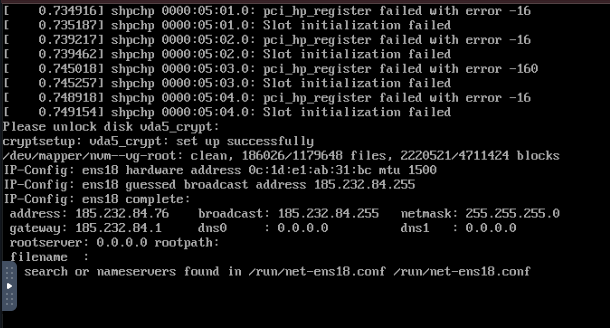
If the IP parameter was added correctly, you should be greeted with the following parameter listing displayed after the network is set up with initramfs.
Configuring static IPv6 address
Due to lack of support of IPv6 in minimal klibc-utils package bundled in initramfs on Debian based distributions, IPv6 configuration is not officially supported at initramfs stage. This poses a significant challenge especially in IPv6-only environments.
While getting IPv6 to work in early-userspace is possible, but it must be performed via a custom initramfs hooks. An example of such hook can be found here.