
Onidel supports AMD SEV-SNP technology on EPYC™ Premium Virtual Machines in all locations except Vietnam.
Price
Using AMD SEV-SNP is free of charge.
It is a feature that can be turned on and off for a VM at any time.
Requirements and Limitations
AMD SEV-SNP requires certain conditions to be fully functional:
-
UEFI boot mode - AMD SEV-SNP requires the VM to be booted in UEFI boot mode.
-
Recent Linux Operating System - AMD SEV-SNP requires kernel 6.11 or newer inside guest to work reliably. Additionally, if you are using the GRUB bootloader, ensure EFI_UNACCEPTED_MEMORY is supported. Otherwise your guest OS may not be able to address all the allocated memory while SEV-SNP is enabled. It is recommended to use GRUB version 2.12 or newer.
It also comes with a few drawbacks:
-
No vTPM or Secure Boot - Current implementation of AMD SEV-SNP inside the hypervisor we use does not support vTPM or Secure Boot. We will focus on exploring alternative solutions to enable vTPM support running inside SEV-SNP environment at VMPL0, like the Coconot SVSM.
-
No Live Migration - The VM will be powered off during hypervisor maintenance since AMD SEV-SNP can not run on a different CPU.
Operating System Support
As of June 2026, some Operating Systems (or their installers) still may not fully support SEV-SNP.
| Operating System | SEV-SNP Support | Notes |
|---|---|---|
| Ubuntu Server 26.04 | ✅ | Ubuntu Server 26.04 offers full SEV-SNP support and can be installed with it enabled. |
| AlmaLinux 10.2 | ✅ | AlmaLinux 10.2 was verified to install and boot properly with SEV-SNP enabled. |
| ArchLinux 2026.06.01 | ✅ | ArchLinux 2026.06.01 was verified to install and boot properly with SEV-SNP enabled. |
| Debian 13 | ✅* | Debian needs to be installed with SEV-SNP disabled at first, the feature can be enabled after installation. |
| AlpineLinux 3.24.1 | ❌* | AlpineLinux kernel is not compiled with memory encryption support. It will not boot with SEV-SNP enabled. It could be possible to get SEV-SNP support by building own kernel with CONFIG_AMD_MEM_ENCRYPT=y and CONFIG_SEV_GUEST=y config options. |
| Ubuntu Server 22.04 | ❌ | Ubuntu Server 22.04 comes with Linux Kernel version 5.15 LTS which does not have SEV-SNP support. The OS will crash before boot. |
| OpenBSD 7.9 | ❌ | OpenBSD does not provide SEV-SNP yet, although there are plans to implement it in future releases. |
Enabling SEV-SNP for your VM
-
In Onidel Cloud Platform, navigate to Compute > Virtual Machines > (Select your VM) > Settings. From there, you need to change the Boot Mode to UEFI and click on Change Boot Mode button.
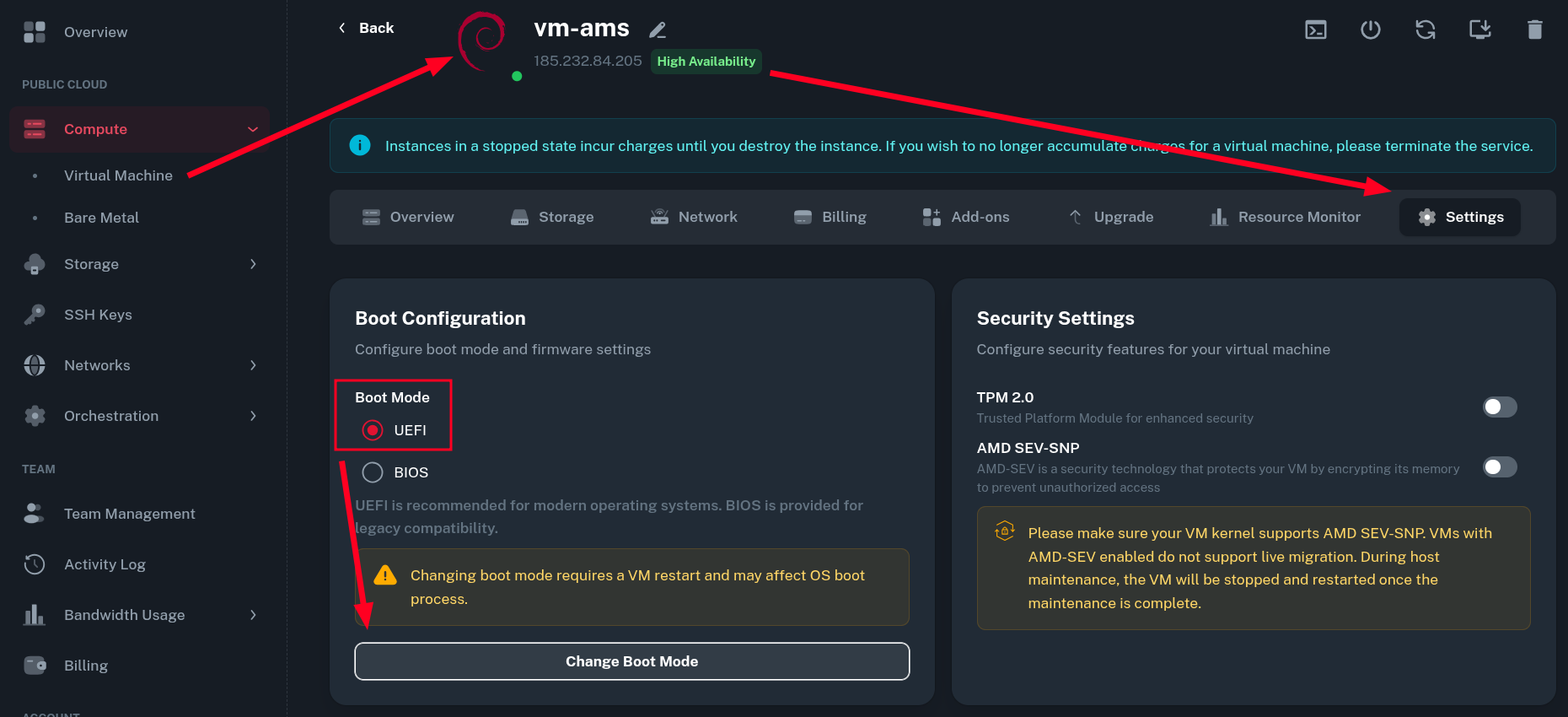
The VM will restart automatically after the changes to Boot Configuration.
-
After the VM is restarted, you can now enable the AMD SEV-SNP option in the Security Settings. Then, you will need to restart the Virtual Machine manually by clicking on Server Restart icon.
-
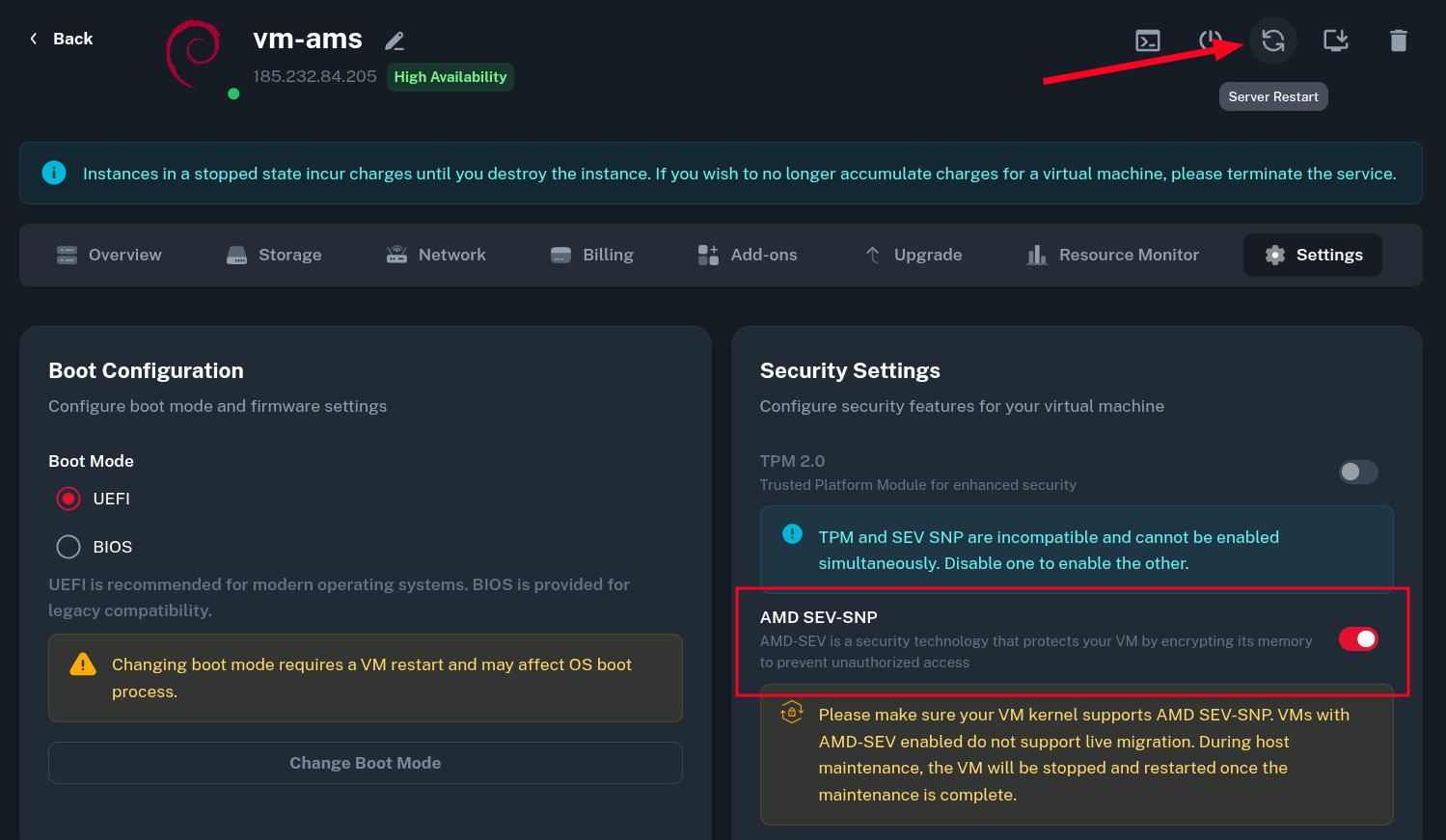
Once the VM boots back up, you should see the notices about AMD SEV features in the system dmesg log. This indicates the feature has been enabled successfully and the VM currently has its memory encrypted.
$ dmesg | grep SEV
[    0.391403] Memory Encryption Features active: AMD SEV SEV-ES SEV-SNP
[    0.392603] SEV: Status: SEV SEV-ES SEV-SNP
[    0.515139] SEV: APIC: wakeup_secondary_cpu() replaced with wakeup_cpu_via_vmgexit()
[    0.569713] SEV: Using SNP CPUID table, 33 entries present.
[    0.570745] SEV: SNP running at VMPL0.
[    1.471827] SEV: SNP guest platform device initialized.
[    8.508905] sev-guest sev-guest: Initialized SEV guest driver (using VMPCK0 communication key)
[    9.297485] kvm_amd: KVM is unsupported when running as an SEV guest
Attestation
You can use the snpguest utility to perform guest attestation and make sure your VM runs on a genuine AMD CPU (the Versioned Chip Endorsement Key (VCEK) is signed by authentic key from AMD).
Installing snpguest
-
Install required dependencies. snpguest is written in Rust and requires to be compiled manually since it has not been packaged for all major distributions yet.
On Debian/Ubuntu:
$ apt update
$ apt install -y curl git gcc make pkg-config libssl-dev
On CentOS/RHEL/Alma/Rocky:
$ dnf update -y
$ dnf install -y curl git gcc make pkgconfig openssl-devel
Then install the newest version of Rust from the rustup distribution.
$ curl --proto '=https' --tlsv1.2 -sSf https://sh.rustup.rs | sh -
Next clone the snpguest repository, activate the rust environment and compile the utility with cargo.
$ git clone https://github.com/virtee/snpguest.git $ cd snpguest $ source "$HOME/.cargo/env" $ cargo build --release ... Compiling snpguest v0.10.0 (/root/snpguest) Finished `release` profile [optimized] target(s) in 5m 51s -
After the successful compilation, the resulting binary should be in
target/releasedirectory.$ ./target/release/snpguest Navigation utility for AMD SEV-SNP guest environment Usage: snpguest [OPTIONS] <COMMAND> Commands: report Report command to request an attestation report certificates Certificates command to request cached certificates from the AMD PSP fetch Fetch command to request certificates verify Verify command to verify certificates and attestation report display Display command to display files in human readable form key Key command to generate derived key ok Probe system for SEV-SNP support generate Generate Pre-Attestation components help Print this message or the help of the given subcommand(s) Options: -q, --quiet Don't print anything to the console -h, --help Print help -V, --version Print version
Generating Attestation Report
Now you can generate the attestation report.
$ snpguest report report.bin request-data.txt --random
This command will generate two files:
-
report.bin- an attestation report of your VM. -
request-data.txt- securely generated random data that acts like a 512 bits nonce and prevents replay attacks.
Reading Attestation Report
You can display the attestation report taken in the previous step using the display report command of snpguest.
Here, you can see all the environment parameters of your Virtual Machine. There is also the SHA-384 Measurement Hash of current environment which will be used for expected launch measurement verification in the next section of this guide.
$ snpguest display report report.bin
Attestation Report:

Version:                      3

Guest SVN:                    0

Guest Policy (0x30000):
  ABI Major:     0
  ABI Minor:     0
  SMT Allowed:   true
  Migrate MA:    false
  Debug Allowed: false
  Single Socket: false
  CXL Allowed:   false
  AEX 256 XTS:   false
  RAPL Allowed:  false
  Ciphertext hiding: false
  Page Swap Disable: false

...

Current TCB:

TCB Version:
  Microcode:   222
  SNP:         28
  TEE:         0
  Boot Loader: 4
  FMC:         None

Platform Info (39):
  SMT Enabled:               true
  TSME Enabled:              true
  ECC Enabled:               true
  RAPL Disabled:             false
  Ciphertext Hiding Enabled: false
  Alias Check Complete:      true
  SEV-TIO Enabled:           false

Key Information:
    author key enabled: false
    mask chip key:      false
    signing key:        vcek

Report Data:
F1 F1 78 33 45 E0 58 77 57 12 83 6C 57 C9 76 4B
1E 7F C9 97 F7 F4 21 A3 38 A4 09 E5 58 BF F4 16
6B EE D3 86 E2 69 9E 45 F7 D5 11 52 3E 2E D5 22
31 FA 70 2C EB 4F 99 53 2D B4 B5 B1 7C 01 5D 25

Measurement:
E9 BF F4 69 E7 D3 D1 F5 84 B0 FA 32 27 92 C0 03
4A 50 C7 75 17 D3 A0 85 16 0E 30 07 0E F4 04 88
60 9D 47 0B EB A3 02 58 97 8B A1 6B 96 C2 0A 74

...
Fetching AMD Certificate Chain
To verify the signature on your report, you need the public certificate chain. It consists of the AMD Root Key (ARK), AMD SEV Key (ASK), and the Versioned Chip Endorsement Key (VCEK). The certificate chain is fetched from the AMD Key Distribution System (KDS).
Note: use the value milan on EPYC™ Premium and turin on EPYC™ High-Frequency Virtual Machines.
$ mkdir certs
$ snpguest fetch ca pem ./certs milan  # turin if running epyc high-frequency vm
$ snpguest fetch vcek pem ./certs report.bin
$ ls -la certs/
total 20
drwxr-xr-x 2 root root 4096 Feb 28 19:09 .
drwxr-xr-x 8 root root 4096 Feb 28 19:01 ..
-rw-r--r-- 1 root root 2277 Feb 28 19:02 ark.pem
-rw-r--r-- 1 root root 2325 Feb 28 19:02 ask.pem
-rw-r--r-- 1 root root 1887 Feb 28 19:09 vcek.pem
Verifying the Certificate Chain
Now use the snpguest utility to verify fetched certificates. This ensures that the VCEK was legitimately signed by the ASK, and the ASK was signed by the ARK. The correct output is shown below.
$ snpguest verify certs ./certs
The AMD ARK was self-signed!
The AMD ASK was signed by the AMD ARK!
The VCEK was signed by the AMD ASK!
Verifying the Attestation Report
Finally, verify the attestation report of your VM. The expected output shown below.
$ snpguest verify attestation ./certs report.bin
Reported TCB Boot Loader from certificate matches the attestation report.
Reported TCB TEE from certificate matches the attestation report.
Reported TCB SNP from certificate matches the attestation report.
Reported TCB Microcode from certificate matches the attestation report.
VEK signed the Attestation Report!
The successful verification means:
-
The report was cryptographically signed by genuine AMD hardware (your VM is not being emulated or spoofed by a malicious hypervisor).
-
The state and measurements of your VM match the expected policies of a SEV-SNP confidential environment.
Measured Boot
Measured boot is now supported at Onidel. It is described in a separate article - AMD SEV-SNP Expected Launch Measurement Verification.
Additional Notes
OVMF Stub
This section was moved to a new article.
Data Encryption
While properly working AMD SEV-SNP encrypts the working memory (RAM) making it impossible to trivially dump it from the hypervisor, your data may still not be encrypted at rest.
If you need to make sure your data remains inaccessible from the hypervisor, we strongly recommend performing a Custom OS installation using LUKS to encrypt data on the disk. In cloud environments, this can be automated using a preseed file, as showcased in our Debian Preseed Installation guide.
Changing SWIOTLB Size
The amount of RAM you get with SEV-SNP enabled may be slightly lower. This is because Linux Kernel allocated certain region of shared memory for unencrypted communication with external devices (SWIOTLB bounce buffers). By default, Linux kernel allocates 64 MB of RAM for bounce buffers when SEV-SNP is active.
The size of this allocation can be controlled with a kernel parameter. For example swiotlb=4096 means there will be 4096 slots allocated. Since each slot is 2KB in size, this will make the kernel only take away 8MB of working memory for the bounce buffers.
Performance Benchmarks
To encrypt and decrypt memory contents, AMD SEV-SNP uses a dedicated hardware AES-128 encryption engine integrated within the DRAM controller of EPYC CPU. This eliminates the need for the CPU to perform any expensive cryptographic operations associated with encryption memory at GB/s speeds.
As a result, the performance in synthetic benchmarks is almost on par with a VM that has memory unencrypted. The impact of SEV-SNP is most noticeable on the disk IO speeds. To communicate with external devices like nvme disks on the host, the guest needs to copy unencrypted version of the data to a shared memory region using SWIOTLB (Software I/O Translation Lookaside Buffer). This slows down IO operations especially at high speeds due to the data copying operations required.
Both benchmarks were taken using yabs.sh on EPYC™ Premium (Milan) platform.
Without AMD SEV-SNP
Sat Feb 28 19:42:15 UTC 2026

Basic System Information:
---------------------------------
Uptime     : 0 days, 0 hours, 2 minutes
Processor  : AMD EPYC 7713 64-Core Processor
CPU cores  : 1 @ 1996.249 MHz
AES-NI     : ✔ Enabled
VM-x/AMD-V : ✔ Enabled
RAM        : 1.9 GiB
Swap       : 0.0 KiB
Disk       : 19.6 GiB
Distro     : Debian GNU/Linux 13 (trixie)
Kernel     : 6.12.73+deb13-amd64
VM Type    : KVM
IPv4/IPv6  : ✔ Online / ✔ Online

IPv6 Network Information:
---------------------------------
ISP        : Onidel Pty Ltd
ASN        : AS152900 Onidel Pty Ltd
Host       : Onidel Pty Ltd
Location   : Amsterdam, North Holland (NH)
Country    : Netherlands

fio Disk Speed Tests (Mixed R/W 50/50) (Partition /dev/vda1):
---------------------------------
Block Size | 4k            (IOPS) | 64k           (IOPS)
  ------   | ---            ----  | ----           ----
Read       | 120.81 MB/s  (30.2k) | 1.79 GB/s    (28.0k)
Write      | 121.13 MB/s  (30.2k) | 1.80 GB/s    (28.1k)
Total      | 241.95 MB/s  (60.4k) | 3.59 GB/s    (56.1k)
           |                      |
Block Size | 512k          (IOPS) | 1m            (IOPS)
  ------   | ---            ----  | ----           ----
Read       | 10.06 GB/s   (19.6k) | 6.74 GB/s     (6.5k)
Write      | 10.59 GB/s   (20.6k) | 7.19 GB/s     (7.0k)
Total      | 20.66 GB/s   (40.3k) | 13.93 GB/s   (13.6k)

Geekbench 6 Benchmark Test:
---------------------------------
Test            | Value
                |
Single Core     | 1232
Multi Core      | 1338
Full Test       | https://browser.geekbench.com/v6/cpu/16798001

YABS completed in 10 min 40 sec
With AMD SEV-SNP
Sat Feb 28 19:58:14 UTC 2026

Basic System Information:
---------------------------------
Uptime     : 0 days, 0 hours, 0 minutes
Processor  : AMD EPYC 7713 64-Core Processor
CPU cores  : 1 @ 1996.249 MHz
AES-NI     : ✔ Enabled
VM-x/AMD-V : ✔ Enabled
RAM        : 1.8 GiB
Swap       : 0.0 KiB
Disk       : 19.6 GiB
Distro     : Debian GNU/Linux 13 (trixie)
Kernel     : 6.12.73+deb13-amd64
VM Type    : KVM
IPv4/IPv6  : ✔ Online / ✔ Online

IPv6 Network Information:
---------------------------------
ISP        : Onidel Pty Ltd
ASN        : AS152900 Onidel Pty Ltd
Host       : Onidel Pty Ltd
Location   : Amsterdam, North Holland (NH)
Country    : Netherlands

fio Disk Speed Tests (Mixed R/W 50/50) (Partition /dev/vda1):
---------------------------------
Block Size | 4k            (IOPS) | 64k           (IOPS)
  ------   | ---            ----  | ----           ----
Read       | 96.56 MB/s   (24.1k) | 768.70 MB/s  (12.0k)
Write      | 96.81 MB/s   (24.2k) | 772.75 MB/s  (12.0k)
Total      | 193.37 MB/s  (48.3k) | 1.54 GB/s    (24.0k)
           |                      |
Block Size | 512k          (IOPS) | 1m            (IOPS)
  ------   | ---            ----  | ----           ----
Read       | 1.74 GB/s     (3.4k) | 2.05 GB/s     (2.0k)
Write      | 1.84 GB/s     (3.5k) | 2.19 GB/s     (2.1k)
Total      | 3.59 GB/s     (7.0k) | 4.24 GB/s     (4.1k)

Geekbench 6 Benchmark Test:
---------------------------------
Test            | Value
                |
Single Core     | 1380
Multi Core      | 1376
Full Test       | https://browser.geekbench.com/v6/cpu/16798234

YABS completed in 10 min 0 sec