
This guide is a continuation of the the main AMD SEV-SNP article and assumes you have already enabled and verified SEV-SNP on your VM.
In an AMD SEV-SNP environment, the memory and CPU registers of your guest virtual machine are cryptographically protected from the hypervisor. However, ensuring confidentiality is only half of the puzzle. With SEV-SNP architecture, it's also possible to cryptographically verify the integrity of the operating system code executing at boot.
During the initial launch, the AMD Secure Processor measures the initial guest memory state, which includes the virtual firmware (OVMF) and the loaded boot artifacts. In a traditional boot architecture, the kernel and initramfs are separate files loaded dynamically from disk. If kept separate, a malicious hypervisor could modify the initramfs (to inject malware) or alter the kernel command line parameters without changing the kernel binary itself.
A Unified Kernel Image (UKI) solves this by packing the UEFI boot stub, the Linux kernel, the initramfs, and the kernel command line into a single .efi PE/COFF binary. Because the entire binary is loaded into memory and measured as a single unit at boot, any tampering with the command line or early userspace code will alter the SEV-SNP launch measurement.
The AMD Secure Processor calculates the launch measurement based on several inputs: the number of vCPUs, CPU model, the UEFI firmware (OVMF) and the UKI (kernel+parameters+initramfs). If any of these parameters differ, the resulting hash will change. You may calculate the expected launch measurement value independently in a trusted environment using the sev-snp-measure utility. Then compare it with the measurement hash returned by the AMD Secure Processor.
Generating UKI image with dracut
Since most SEV-SNP supporting Linux distributions come with dracut initrd generator, this section will assume it is already installed and configured on the system. Unlike the old initramfs-tools (default generator on Debian), dracut can also generate UKI kernel images natively.
We just need to install the systemd-boot dependency.
$ apt install systemd-boot           # Ubuntu 26.04+
$ dnf install systemd-boot-unsigned  # AlmaLinux 10.2+
The systemd-boot (or systemd-boot-unsigned) package contains the pre-compiled UEFI boot stub (/usr/lib/systemd/boot/efi/linuxx64.efi.stub). dracut requires this stub to act as the entry executable. The UEFI firmware runs this stub first, which then transitions execution to the embedded kernel and initramfs.
After that, you need to note the kernel parameters (cmdline) of currently booted environment.
$ cat /proc/cmdline
BOOT_IMAGE=/vmlinuz-7.0.0-22-generic root=/dev/mapper/ubuntu--vg-ubuntu--lv ro
Next, create a new file in /etc/dracut.conf.d/uki.conf.
There we will tell dracut to generate UKI image (uefi="yes" with the uefi_stub of systemd-boot bootloader) and provide predictable kernel parameters from the step above. You should omit the BOOT_IMAGE or similar variables and put just the parameters after root=.
Then, reproducible="yes" makes dracut omit non-deterministic build metadata. That means, unless the actual kernel/initramfs is modified, the UKI should be byte-to-byte identical across builds.
Lastly, the machine_id="no" will not include machine-id systemd parameter in the resulting UKI filename, making it deterministic.
uefi="yes"
uefi_stub="/usr/lib/systemd/boot/efi/linuxx64.efi.elf"
kernel_cmdline="root=/dev/mapper/ubuntu--vg-ubuntu--lv ro"
reproducible="yes"
machine_id="no"
Once the file is saved, you can trigger dracut UKI generation manually.
$ dracut --force
/var/tmp/dracut.d3EEoNP/uefi/uki.sbat does not contain a valid SBAT section, skipping.
Wrote unsigned /var/tmp/dracut.d3EEoNP/uefi/linux.efi
Given we do not use UEFI Secure Boot (but rather ensure verified boot via SEV-SNP), this warning regarding empty SBAT metadata block is actually expected and can be ignored.
The resulting generated UKI kernel image can be found in /boot/efi/EFI/Linux/ directory:
$ ls -lah /boot/efi/EFI/Linux/
total 77M
drwxr-xr-x 2 root root 4.0K Jun 19 07:44 .
drwxr-xr-x 5 root root 4.0K Jun 19 07:36 ..
-rwxr-xr-x 1 root root  77M Jun 19 07:44 linux-7.0.0-22-generic.efi
Download it into a local directory using scp.
$ scp root@<vm-ip>:/boot/efi/EFI/Linux/linux-7.0.0-22-generic.efi .
Optionally, you may also inspect the contents of generated UKI stub. Using the ukify inspect command, you can see the dummy SBAT section, bootloader parameters, kernel version and cmdline, size and hashes of kernel and initrd contained in the UKI image.
$ apt install systemd-ukify
$ ukify inspect /boot/efi/EFI/Linux/linux-7.0.0-22-generic.efi
.sbat:
  size: 237 bytes
  sha256: a47a46e2ddb7de186cba107151279408dc23ad54a4c8e8d3dac4203894d824b6
  text:
    sbat,1,SBAT Version,sbat,1,https://github.com/rhboot/shim/blob/main/SBAT.md
    systemd-stub,1,The systemd Developers,systemd,259,https://systemd.io/
    systemd-stub.ubuntu,1,Ubuntu,systemd,259.5-0ubuntu3,https://tracker.debian.org/pkg/systemd
.osrel:
  size: 406 bytes
  sha256: de1a366db70de1ae4b6612a1696f9c1f37948028fab733508a3d5cf49836faac
  text:
    PRETTY_NAME="Ubuntu 26.04 LTS"
    NAME="Ubuntu"
    VERSION_ID="26.04"
    VERSION="26.04 LTS (Resolute Raccoon)"
    VERSION_CODENAME=resolute
    ID=ubuntu
    ID_LIKE=debian
    HOME_URL="https://www.ubuntu.com/"
    SUPPORT_URL="https://help.ubuntu.com/"
    BUG_REPORT_URL="https://bugs.launchpad.net/ubuntu/"
    PRIVACY_POLICY_URL="https://www.ubuntu.com/legal/terms-and-policies/privacy-policy"
    UBUNTU_CODENAME=resolute
    LOGO=ubuntu-logo
.cmdline:
  size: 42 bytes
  sha256: faa725c8adfe1844c61c5c70f149f4ba18d2bb77e7e74ba0329ed5a5b5d68f4a
  text:
    root=/dev/mapper/ubuntu--vg-ubuntu--lv ro
.uname:
  size: 16 bytes
  sha256: 29980f8b6e12ad60bd90ebde5a461cb5678ba325b22c5f69e30c0a4abac5ebb8
  text:
    7.0.0-22-generic
.linux:
  size: 17275272 bytes
  sha256: bf61b5a973bc279c55209e737987d54accb5e6b22b5ef4a7ef556a4d286641e0
.initrd:
  size: 63168764 bytes
  sha256: 06990edf68727363a27748cc9561a09b411cb9d2109227e8b8a9d2ea2b089fce
Uploading the UKI image
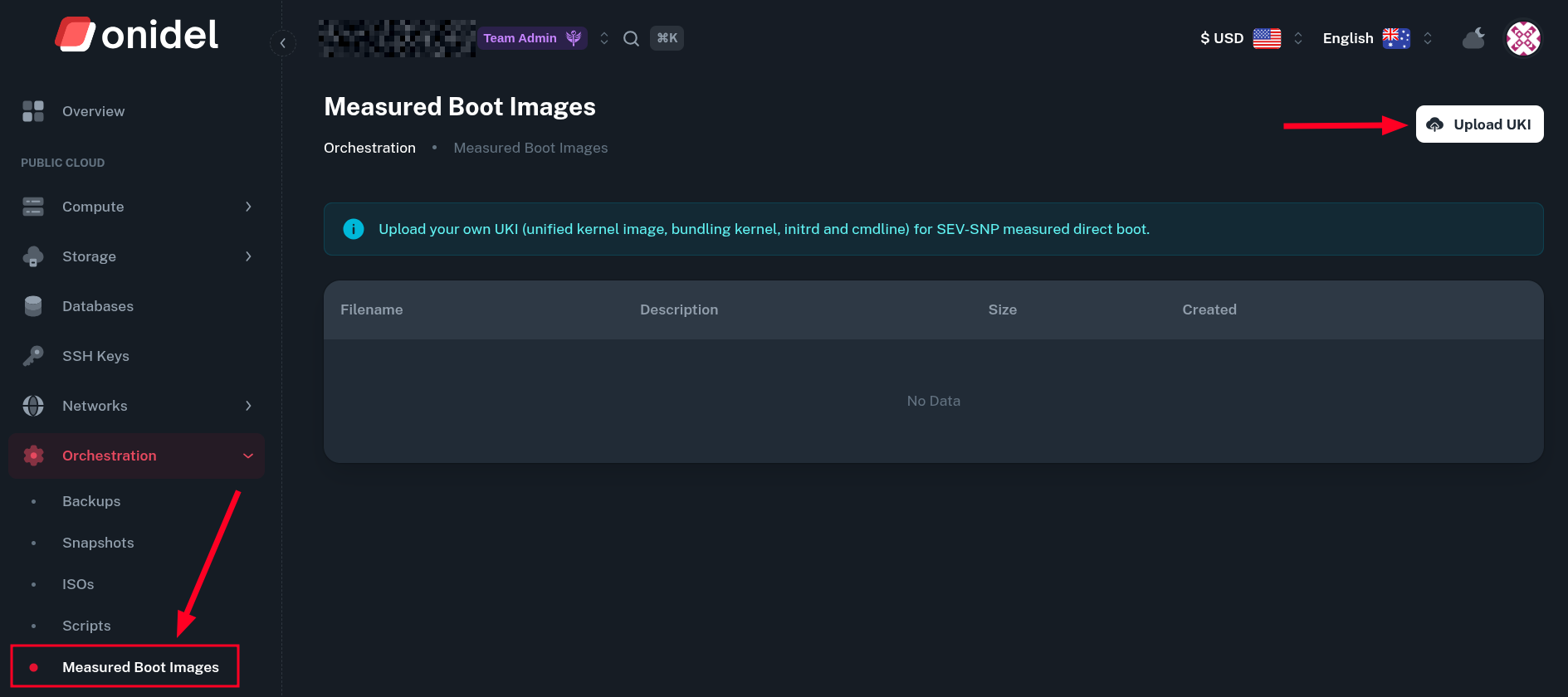
To upload an UKI kernel image for measured boot, go to Orchestration > Measured Boot Images. Then click on Upload UKI.
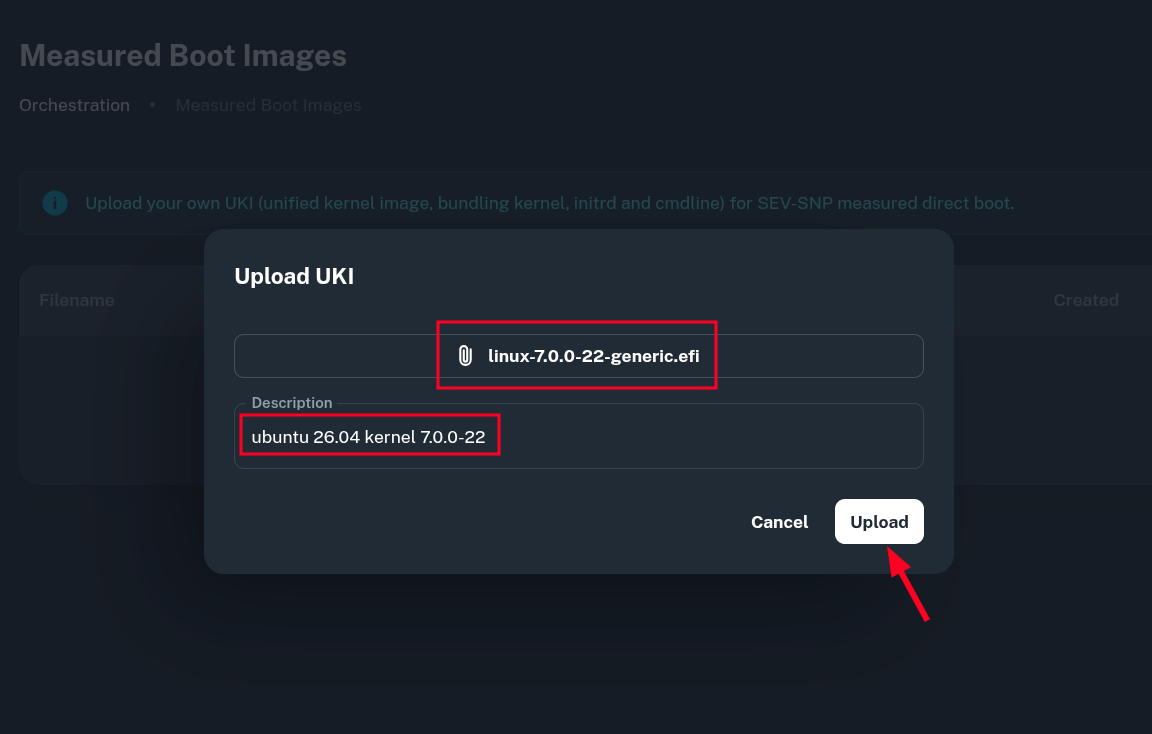
You will be presented with a popup which lets you pick a local UKI file and its description, then upload it into our platform.
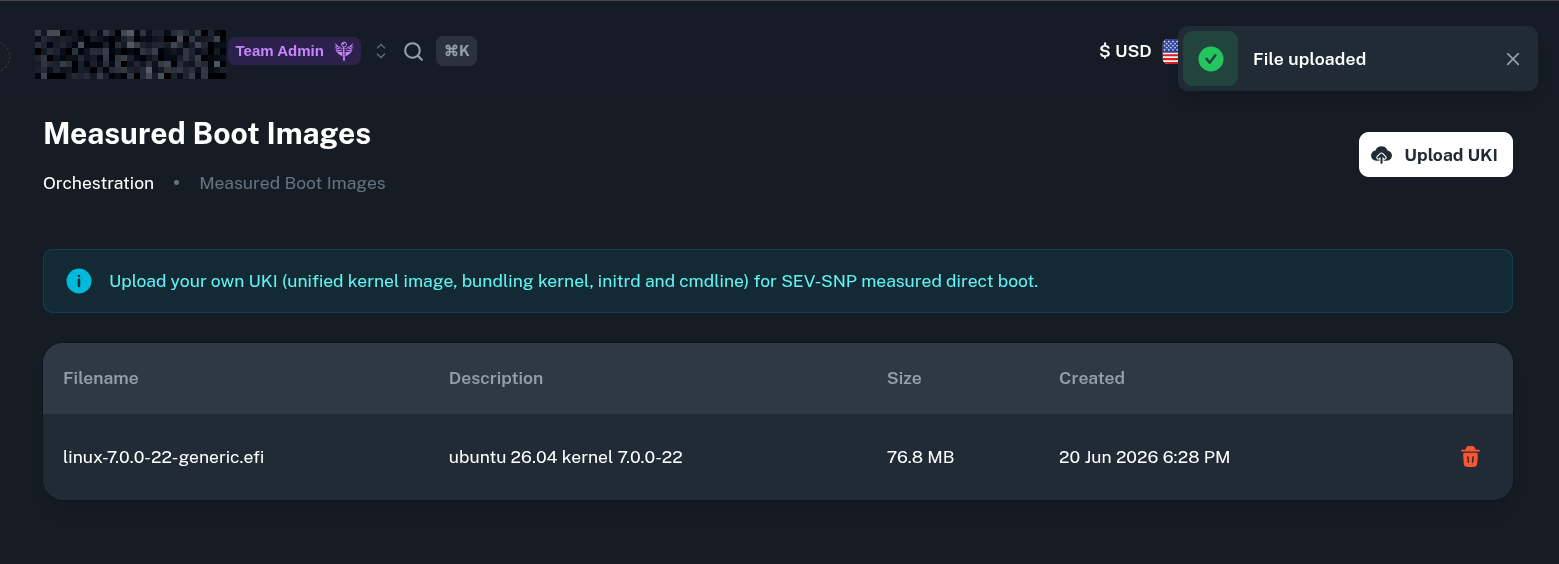
Once the file is successfully uploaded, you will see it in the list of Measured Boot Images.
Enabling Measured Direct Boot
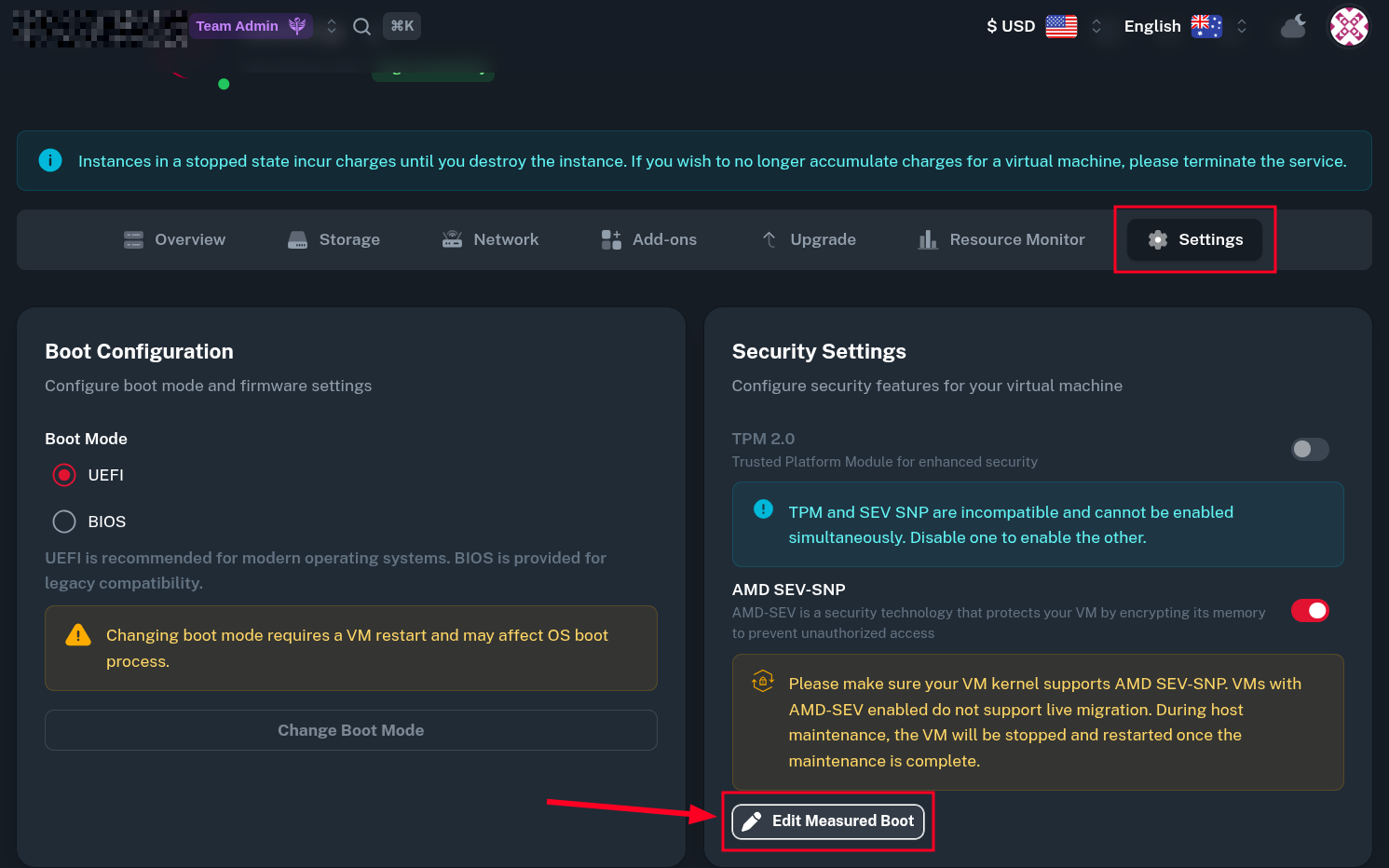
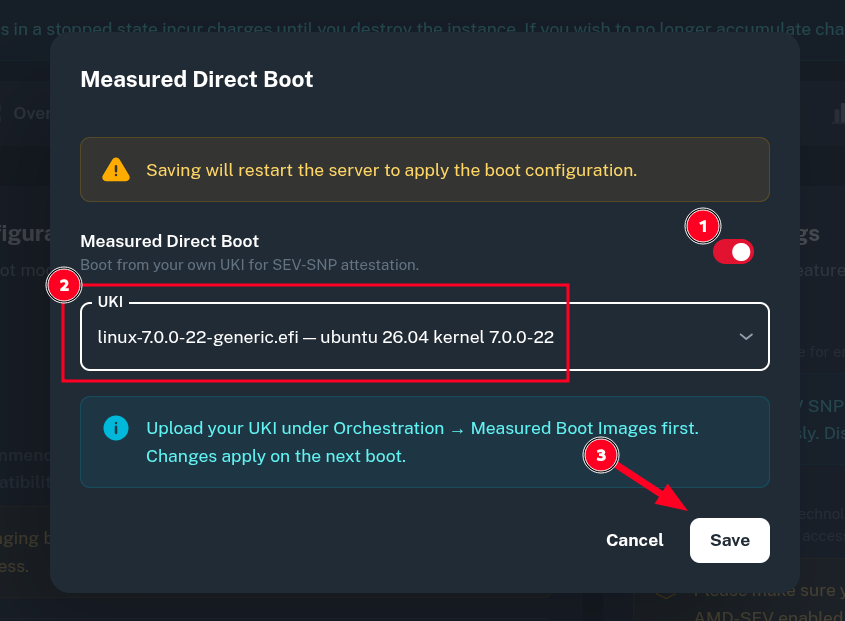
After the UKI image was added on the platform, you may assign it to a VM. To achieve that, you need to first enable SEV-SNP and then click on Edit Measured Boot in Security Settings tab.
In the popup window, first switch the toggle on Measured Direct Boot, then pick the UKI image we've just uploaded and click Save.
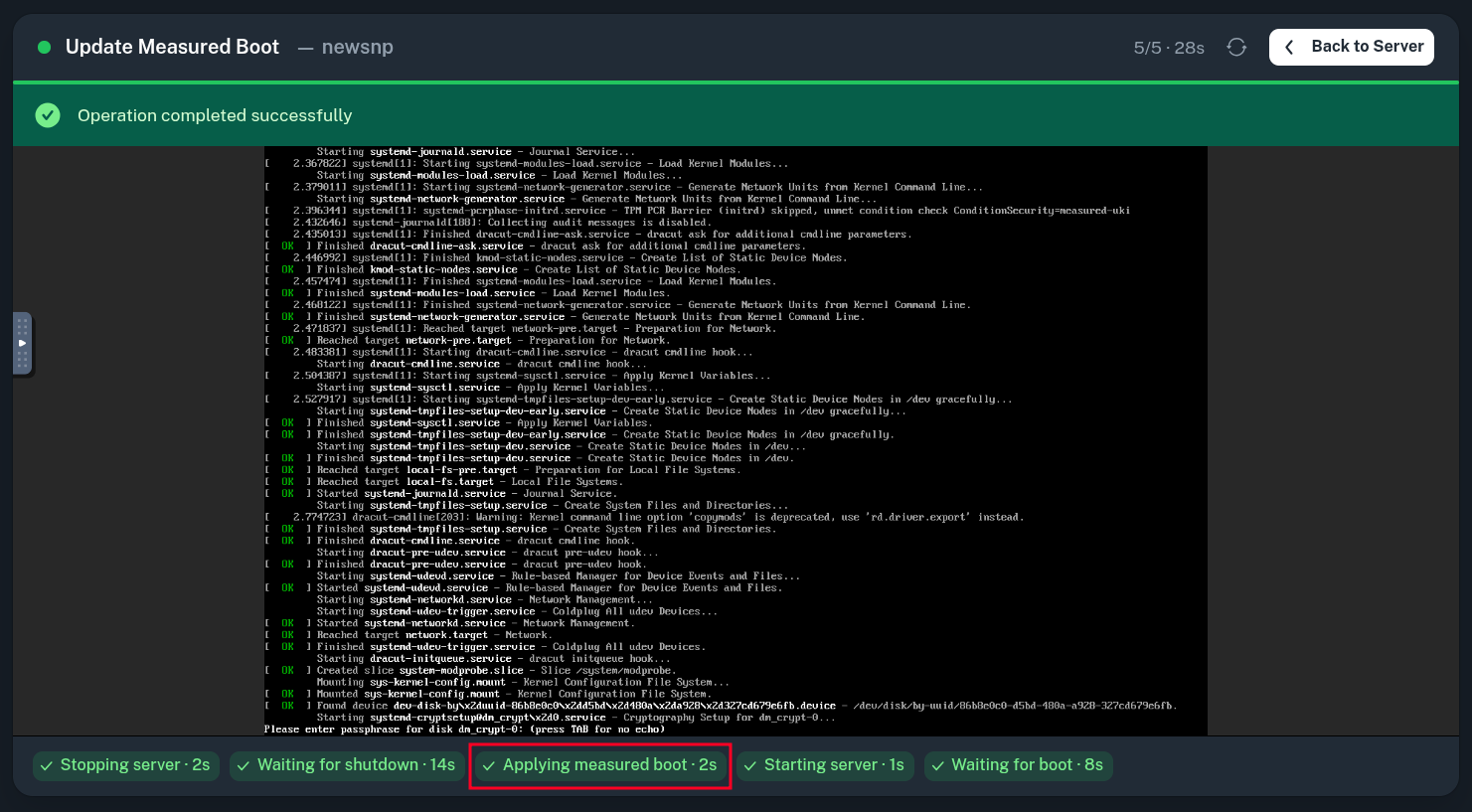
After this, the VM will be automatically rebooted from your UKI image with direct boot settings applied to it.
Calculating Expected Measurement Hash
Virtee's sev-snp-measure tool can be used to independently obtain the expected measurement hash for the current environment of your Virtual Machine. It is supposed to be ran within a trusted environment (not on the measured VM) and needs to be provided with the OVMF firmware and the generated UKI image.
$ ls  # ensure the required files are present in current directory
linux-7.0.0-22-generic.efi  OVMF.amdsev.fd
$ git clone https://github.com/virtee/sev-snp-measure.git  # clone sev-snp-measure
Then run the script and take note of returned hash value. You may need to change the vCPU type (--vcpu-type - EPYC-Milan for Premium VPS, EPYC-Turin for High-Frequency VPS) and expected number of vCPUs (--vcpus) to match your instance parameters.
$ ./sev-snp-measure/sev-snp-measure.py --mode snp --vcpu-type EPYC-Milan --vcpus 1 --ovmf OVMF.amdsev.fd --kernel linux-7.0.0-22-generic.efi
9f04aac41f563c84da348904ab2c2f06ef661426ccf4653e34f5980390c52e420c030607b94d8f584228ce1269bff1b3