
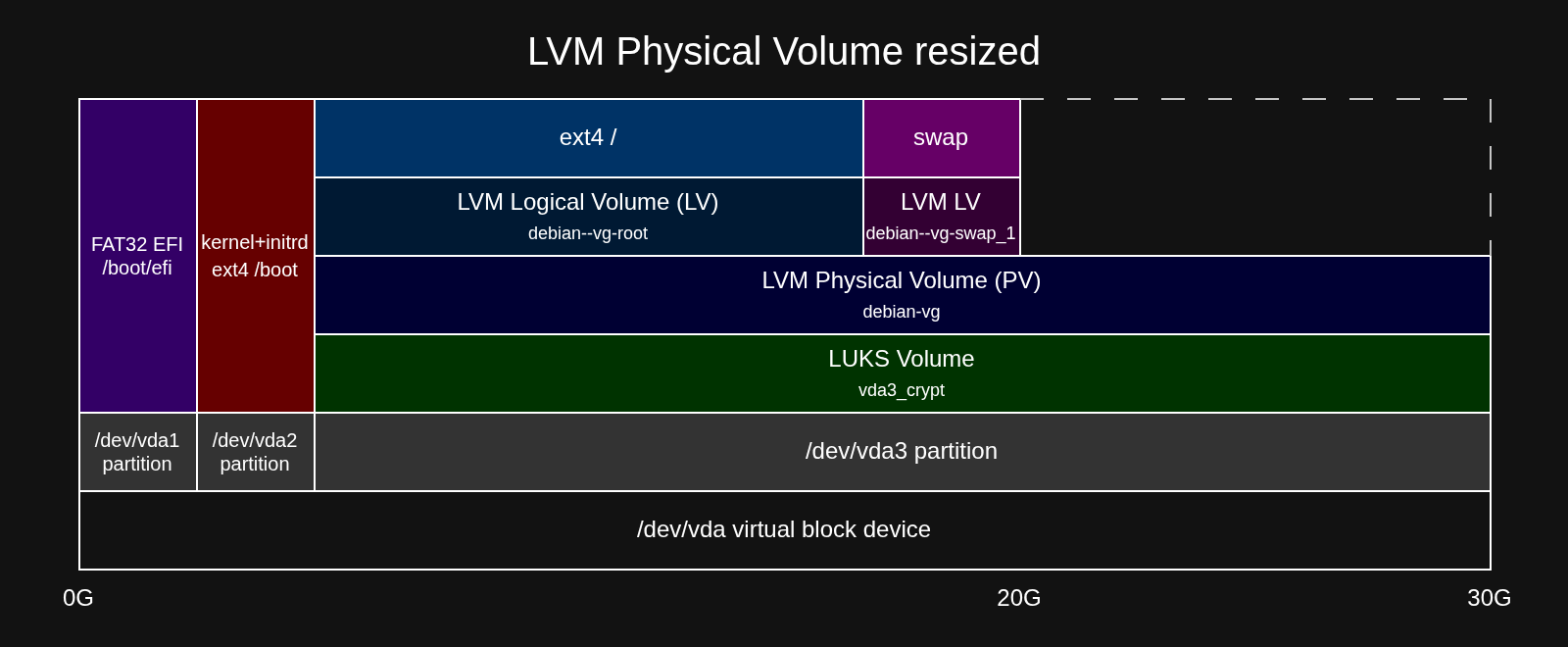
When you perform a storage upgrade on a VPS running a custom Linux installation with LUKS encryption and LVM, the partitions and filesystems will not be resized automatically. Because storage is organized in layers, similar to the layout shown below, you must expand each layer sequentially.
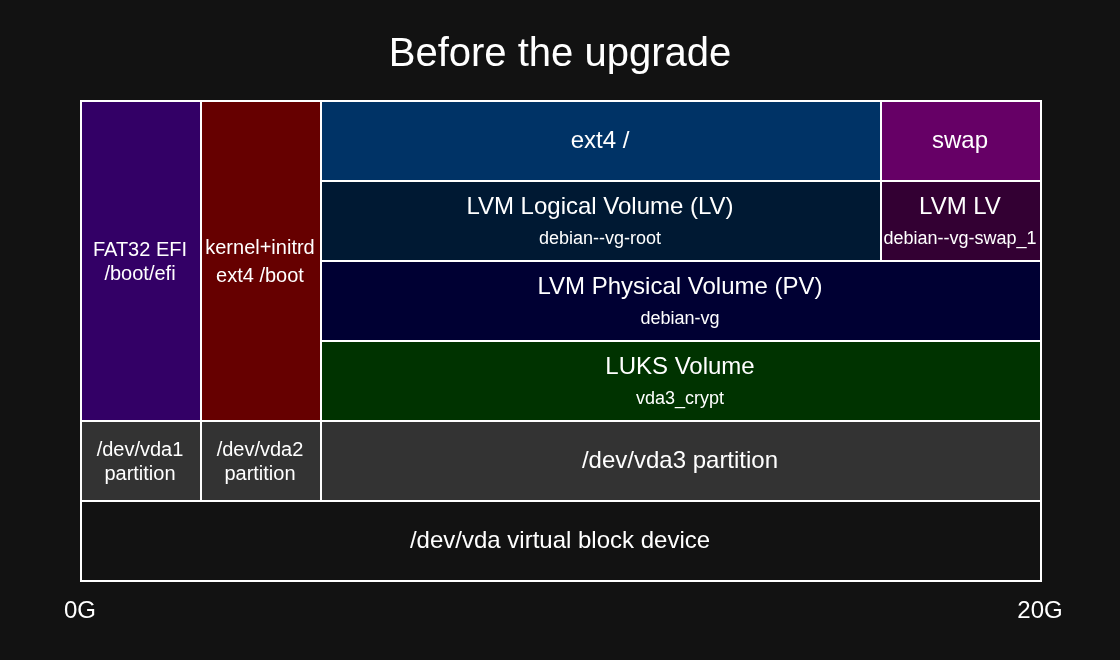
This guide walks you through extending each layer online (without rebooting).
Prerequisites
Backup
While resizing (extending) the partitions, containers and volumes is not a destructive operation and can be performed while the VM stays online, it's important to have a backup of any important data stored on the resized partition before proceeding with later steps.
Software
To resize partitions, we'll be using growpart tool which is a part of larger cloud-guest-utils package.
Make sure it is installed on your system:
-
Debian/Ubuntu based distributions
$ apt install cloud-guest-utils -
RockyLinux/Almalinux
$ dnf install cloud-utils-growpart
Check Your Current Disk Layout
In this example, we upgraded the storage capacity from 20GB to 30GB. Just after upgrade of storage from the panel, your layout should look similar to the one shown below.
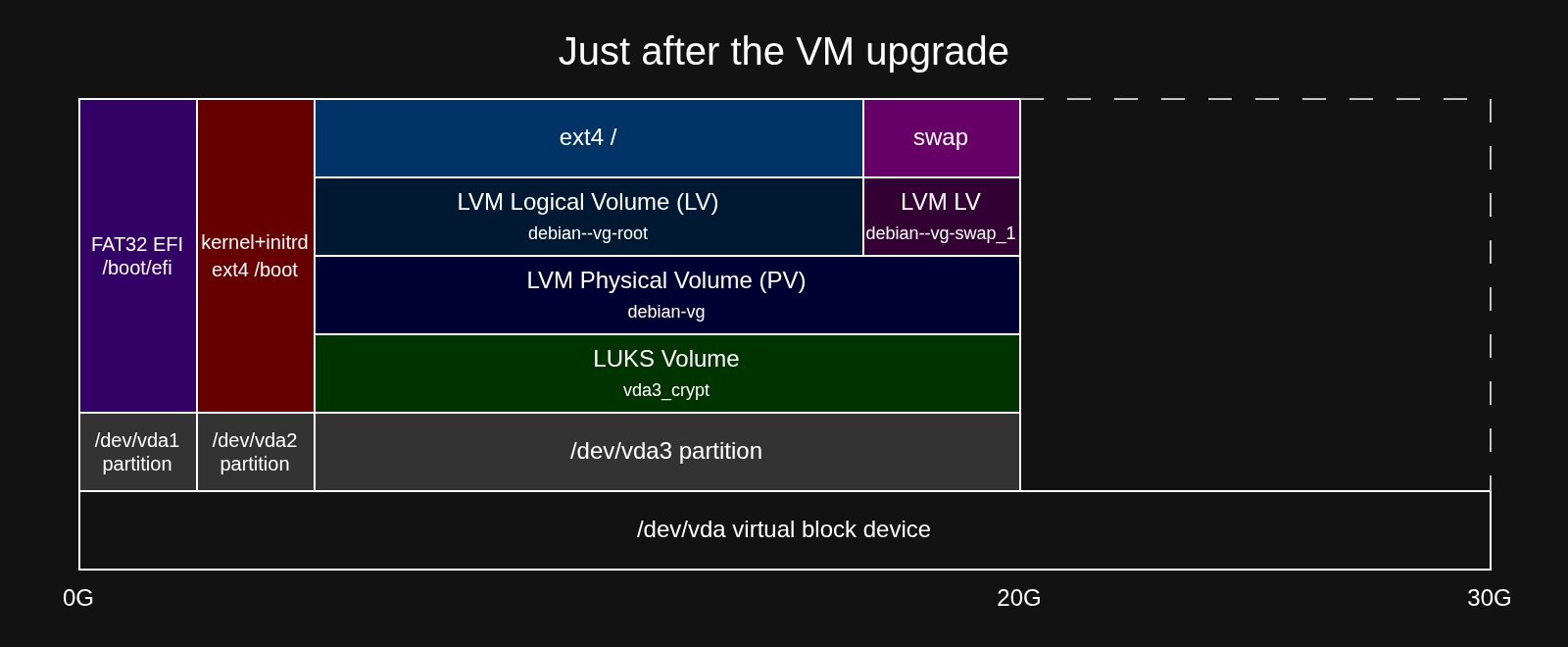
Run fdisk to view the unallocated space and identify the partitions currently present on your VPS.
$ fdisk -l /dev/vda
GPT PMBR size mismatch (41943039 != 62914559) will be corrected by write.
The backup GPT table is not on the end of the device.
Disk /dev/vda: 30 GiB, 32212254720 bytes, 62914560 sectors
Units: sectors of 1 * 512 = 512 bytes
Sector size (logical/physical): 512 bytes / 512 bytes
I/O size (minimum/optimal): 512 bytes / 512 bytes
Disklabel type: gpt
Disk identifier: DAF8165B-E616-41BA-BA48-11892008DEC4

Device       Start      End  Sectors  Size Type
/dev/vda1     2048  1951743  1949696  952M EFI System
/dev/vda2  1951744  3903487  1951744  953M Linux filesystem
/dev/vda3  3903488 41940991 38037504 18.1G Linux filesystem
Next, check the block mapping to verify device hierarchy (LUKS and LVM) of /dev/vda3.
$ lsblk /dev/vda
NAME                    MAJ:MIN RM  SIZE RO TYPE  MOUNTPOINTS
vda                     254:0    0   30G  0 disk
├─vda1                  254:1    0  952M  0 part  /boot/efi
├─vda2                  254:2    0  953M  0 part  /boot
└─vda3                  254:3    0 18.1G  0 part
  └─vda3_crypt          253:0    0 18.1G  0 crypt
    ├─debian--vg-root   253:1    0 17.2G  0 lvm   /
    └─debian--vg-swap_1 253:2    0  956M  0 lvm   [SWAP]
From this layout:
-
Drive:
/dev/vda -
Target Partition:
/dev/vda3(Partition number 3) -
LUKS Container Name:
vda3_crypt -
Root LV Path:
/dev/mapper/debian--vg-root
This is the most standard layout created by automated Debian and Ubuntu installers. If yours looks different, please check the differences before proceeding with later steps.
Extend the Main Partition
Use growpart to expand partition 3 to fill the remaining unallocated space on /dev/vda.
$ growpart /dev/vda 3
CHANGED: partition=3 start=3903488 old: size=38037504 end=41940991 new: size=59011039 end=62914526
Note: growpart automatically corrects any GPT backup header location issues on the enlarged disk.
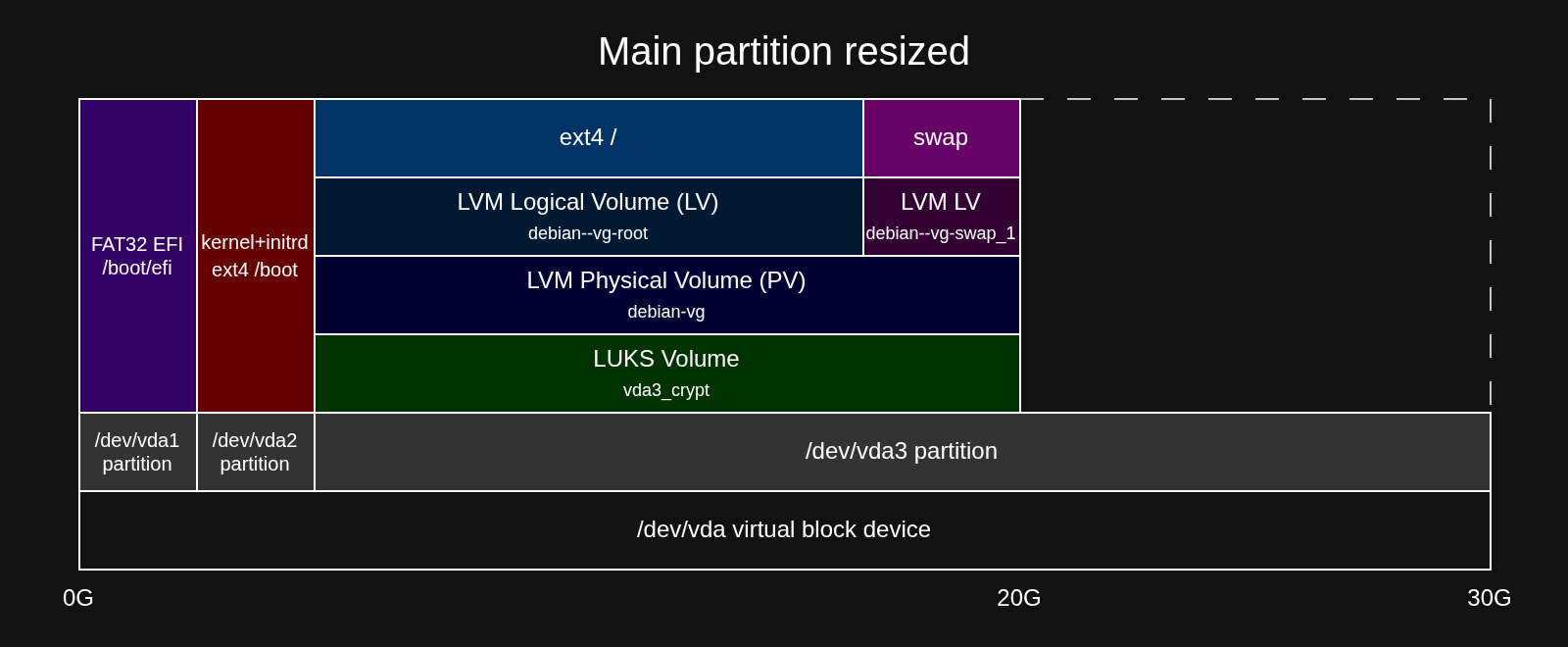
Resize the LUKS Encrypted Container
Using cryptsetup, resize the active LUKS container mapping to take advantage of the newly enlarged physical partition.
$ cryptsetup resize vda3_crypt
Enter passphrase for /dev/vda3:
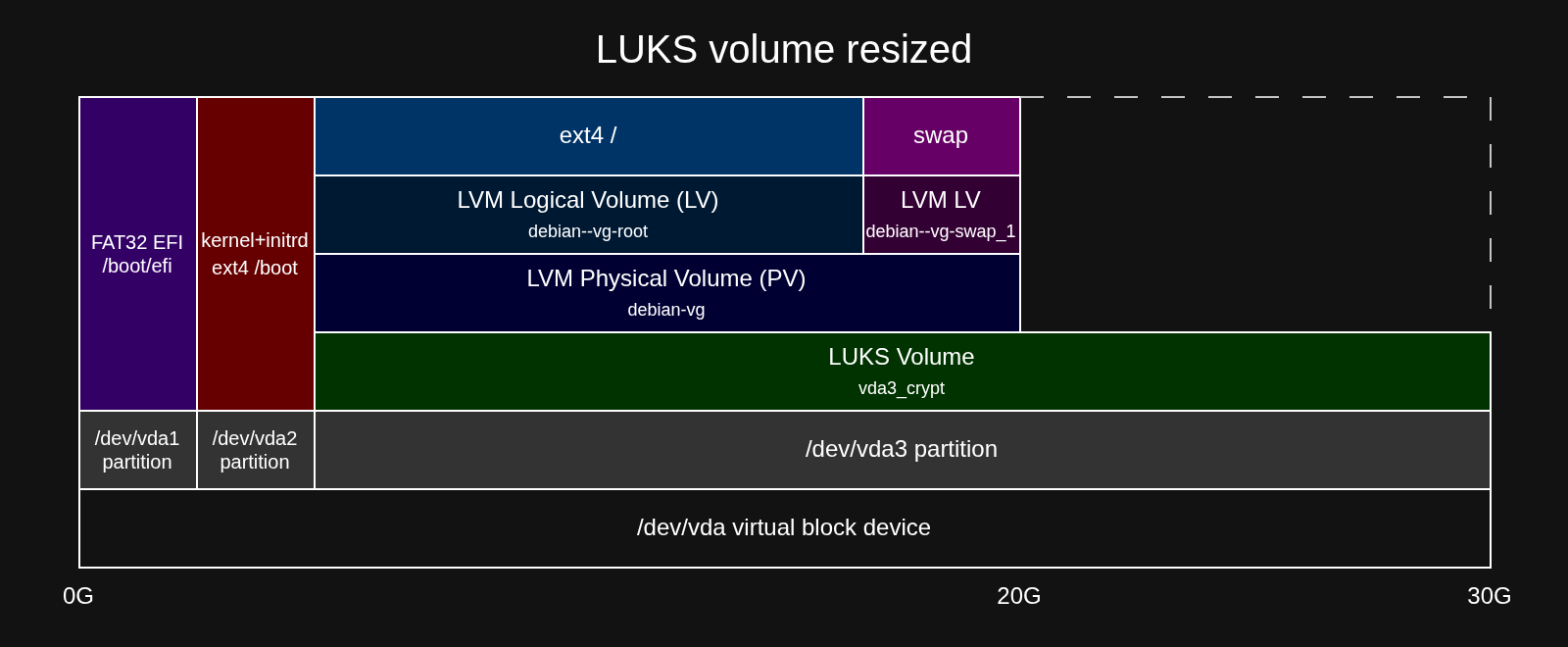
Resize the LVM Physical Volume (PV)
Now that the LUKS container is larger, inform LVM to expand the Physical Volume sitting inside it.
$ pvresize /dev/mapper/vda3_crypt
  Physical volume "/dev/mapper/vda3_crypt" changed
  1 physical volume(s) resized or updated / 0 physical volume(s) not resized
Extend the Logical Volume (LV) and Filesystem
Find the name of LVM logical volume holding the root partition using df.
$ df -h /
Filesystem                   Size  Used Avail Use% Mounted on
/dev/mapper/debian--vg-root   17G  1.2G   15G   8% /
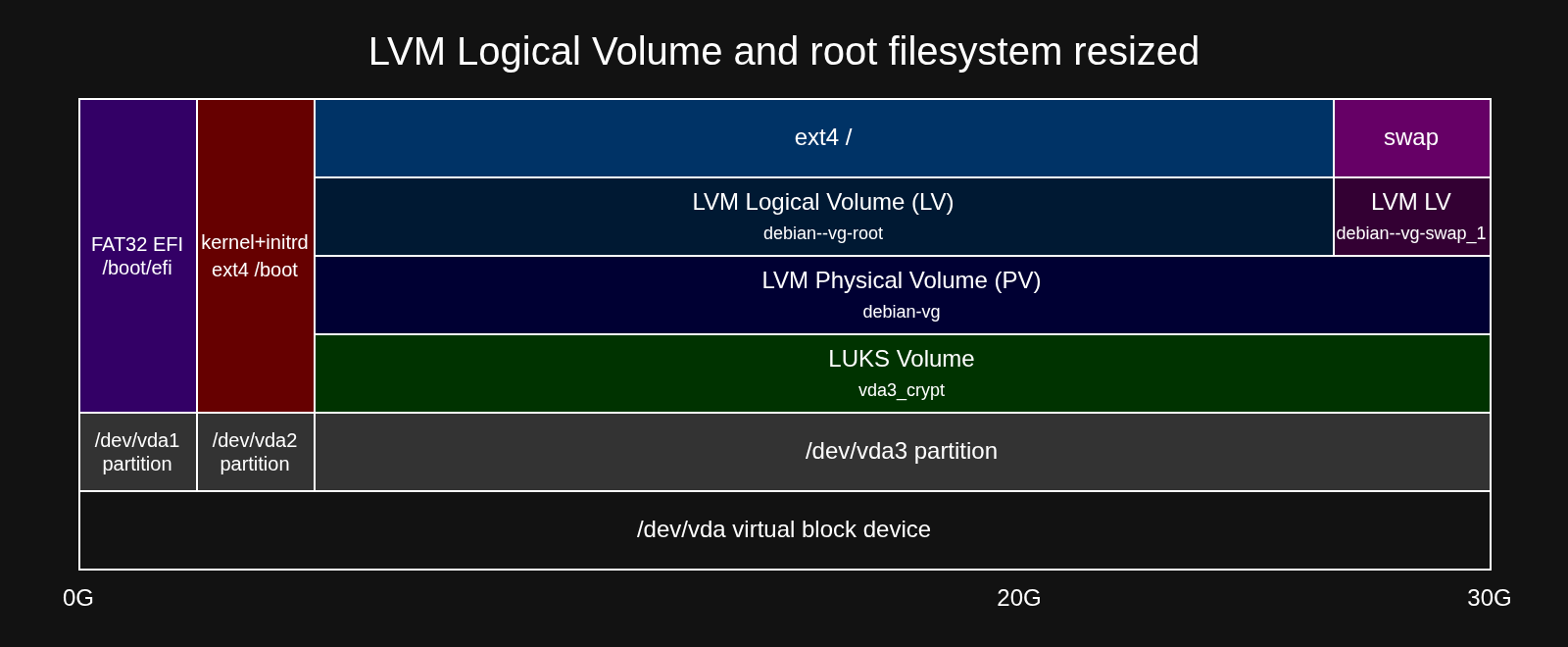
Using lvextend with the -r (resize) flag automatically resizes the logical volume and its underlying filesystem (ext4 in this case) in a single command.
$ lvextend -l +100%FREE -r /dev/mapper/debian--vg-root
  File system ext4 found on debian-vg/root mounted at /.
  Size of logical volume debian-vg/root changed from <17.19 GiB (4400 extents) to <27.19 GiB (6960 extents).
  Extending file system ext4 to <27.19 GiB (29192355840 bytes) on debian-vg/root...
resize2fs /dev/debian-vg/root
resize2fs 1.47.2 (1-Jan-2025)
Filesystem at /dev/debian-vg/root is mounted on /; on-line resizing required
old_desc_blocks = 3, new_desc_blocks = 4
The filesystem on /dev/debian-vg/root is now 7127040 (4k) blocks long.

resize2fs done
  Extended file system ext4 on debian-vg/root.
  Logical volume debian-vg/root successfully resized.
Verify the Changes
Lastly, verify that the root filesystem now shows the increased space.
$ df -h /
Filesystem                   Size  Used Avail Use% Mounted on
/dev/mapper/debian--vg-root   27G  1.2G   25G   5% /